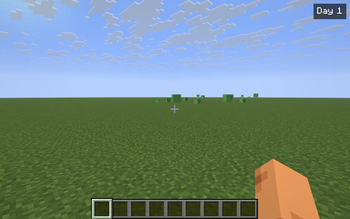
DayCounter is the smallest possible "how long have I been here" HUD. A single badge in the top-right of your screen reads Day 1, Day 2, … and climbs once per in-game day cycle. Vanilla tracks dayTime internally but only surfaces it deep inside F3 — DayCounter pulls that number into your normal field of view, where it actually informs how you play.
What it does
- Reads
world.getTimeOfDay() / 24000and renders the result as Day N in the top-right HUD. - Each in-game world keeps its own baseline day. The first time you enter a save (or join a server), the current world day becomes Day 1 for that world. From then on, the badge counts the days you've spent there, not the world's absolute age.
- Baselines are persisted to
config/daycounter.jsonkeyed by the singleplayer save name or server address. Switching worlds picks up the right counter automatically. - When the day flips from
NtoN+1, the badge briefly pulses yellow so you actually notice the milestone — useful as a passive "another night survived" feedback.
Commands & controls
/daycounter— show the current day in chat (with the world key the mod is tracking against)./daycounter reset— set the current world's baseline to today. The badge reads Day 1 again from now on.- Y — toggle the HUD on/off. The badge also respects F1 (hide HUD) and stays hidden in menus.
Notes
- Pure client-side — install on your client only. Works on any Fabric server, fully vanilla compatible.
- Per-world isolation: each save / each server address has its own baseline.
- The badge updates every client tick — there is no observable performance cost.
- ~200 lines of code, no mixins, no extra dependencies beyond Fabric API.
Compatibility
Minecraft 1.21.8, 1.21.9, 1.21.10, 1.21.11 — Fabric Loader 0.16+. One JAR covers all four. Drop into your mods/ folder alongside Fabric API.
Featured versions
See allProject members

kvapilvaclav0
Owner
Technical information
License
MIT
Client side
required
Server side
unsupported
Project ID